
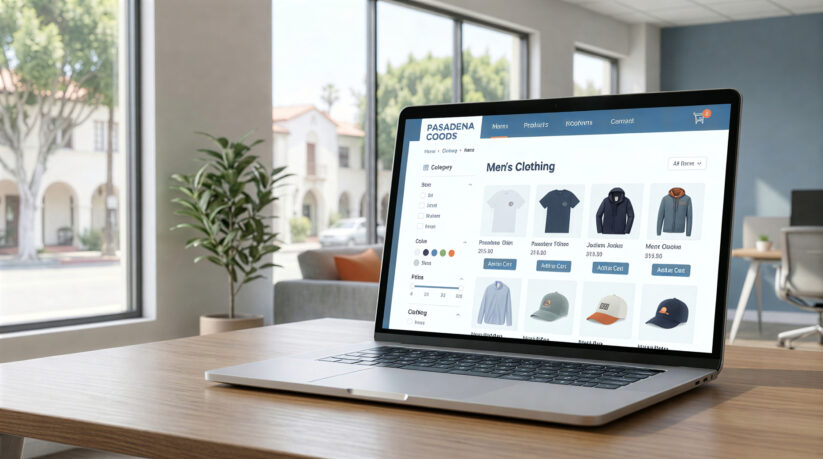
Running online stores in Pasadena means competing with businesses everywhere. Your products might be great, but if shoppers can’t find what they need fast, they’ll leave. Smart ecommerce navigation design and user experience design ecommerce Pasadena strategies turn frustrated browsers into buyers.
This guide shows how clear menu structures, intuitive navigation for ecommerce stores, product filtering, breadcrumb navigation ecommerce sites, and logical flow help increase conversion and drive more sales.
Why Navigation Matters for Pasadena Ecommerce UX Design
Think about walking into a store in Old Pasadena. If the aisles are messy and there are no signs, you’d leave. The same happens on ecommerce websites. Poor ecommerce navigation design pasadena confuses people, and confused shoppers don’t buy.
Good UX design for online stores Pasadena removes friction. When customers find products in a few clicks, they buy more. Studies show 88% of online shoppers won’t return after a bad experience. For Pasadena retailers, that’s too many lost sales.
Ecommerce website navigation tips start with understanding how people shop. When you organize around customer needs, you improve ecommerce conversions Pasadena and reduce bounce rates.
Clear Ecommerce Menu Structure Best Practices
Your main menu is like a store directory. It should tell visitors where to go without making them think hard.
Use simple labels. Instead of creative names, use clear categories like “Women’s Shoes” or “Home Décor.” Pasadena shoppers browsing on phones don’t have time to decode fancy menu names.
Limit top-level items. People can process five to seven options at once. Too many choices overwhelm shoppers. Group related items under broader headings with dropdown menus for subcategories.
A Pasadena boutique might structure their menu like this:
- Women (Dresses, Tops, Bottoms)
- Men (Shirts, Pants, Jackets)
- Accessories
- Sale
Keep menus consistent. When navigation changes from page to page, shoppers lose their way. Use the same menu everywhere.
Professional web design services help Pasadena businesses create menus that match how customers shop, improving pasadena ecommerce website usability.
Product Category Navigation Ecommerce Layouts
Once someone clicks a category, the layout should make browsing easy. This is where shoppers decide to dig deeper or bounce.
Use grid layouts. Grid displays let people scan many products at once. Most successful commerce sites use three or four products per row on desktop and one or two on mobile.
Show key info fast. Each product tile needs a clear image, name, price, and details like “New” or “Sale.” Pasadena shoppers comparing options need pricing without clicking everything.
Add sorting options. Let customers sort by price, popularity, or ratings. Different shoppers have different needs.
Before/after example: A Pasadena home store showed 8 products in one column. Shoppers scrolled forever. After switching to a 3-column grid with filters, they saw a 34% increase in time on site and 22% more products in shopping carts.
Ecommerce Product Filtering UX
Imagine looking for shoes in a store with 500 pairs mixed. Filters solve this problem on commerce websites.
Add useful filters. Common options include size, color, price, brand, and ratings. Pasadena businesses might add “local pickup” or “ships same day.”
Make filters easy to use. Put them in a sidebar or at the top. Use checkboxes and price sliders. Show how many products match each filter.
Allow multiple filters. Someone shopping for “size 10, blue, under $100” should select all three and see only matching items.
Show active filters clearly. Display which filters are on and make them easy to remove.
A Pasadena sporting goods store added filtering. Before, customers clicked through 12 pages before buying. After adding filters for size, color, and price, that dropped to 4 pages. Conversions jumped 18%.
Breadcrumb Navigation Ecommerce Sites
Breadcrumbs are small text links showing your path: “Home > Women’s Clothing > Dresses > Summer Dresses.”
They reduce confusion. When shoppers land on a landing page from search results, breadcrumbs show where they are. This helps them find related specific products.
They make going back easy. Instead of hitting back repeatedly, shoppers click any breadcrumb link. Someone viewing a dress can click “Dresses” to see all options.
They help search engine optimization SEO. Search engines use breadcrumbs to understand your site. This helps your search result listings look better.
Place breadcrumbs near the top, below main navigation.
Logical Flow: Guiding Shoppers to Checkout
Navigation should guide customers toward buying. Every page needs a clear next step.
Create a clear path. From product categories to product listings to cart to checkout, each step should flow naturally. Remove extra clicks.
Use clear buttons. Instead of “Click Here,” use “Add to Cart” or “Proceed to Checkout.” Make buttons stand out with bright colors.
Keep carts visible. Show a cart icon in the header with item counts. When someone adds a product, confirm it and offer options to keep shopping or check out.
Simplify checkout. 21% of shoppers abandon carts because checkout is too hard. Pasadena ecommerce web design services recommend keeping checkout to three steps: shipping, payment, confirmation.
A Pasadena gift shop reduced checkout from 5 steps to 3. Cart abandonment dropped 27% and completed orders rose 15%.
Offer guest checkout. Not everyone wants an account. Let customers check out as guests.
Mobile Navigation for All Screen Sizes
Over 60% of online shopping happens on phones. If your ecommerce ux design doesn’t work on mobile, you lose sales daily.
Use hamburger menus. The three-line icon saves space while keeping categories and subcategories accessible.
Make buttons sufficiently large. Touch targets should be easy to tap. Small buttons frustrate shoppers.
Prioritize speed. Slow load times kill sales. A one-second delay reduces conversions 20%. Fast loading helps the improved user experience.
Simplify forms. Use mobile-friendly inputs, enable autofill, and minimize required fields.
Real Results: Before and After
A Pasadena electronics store redesigned navigation. Here’s what changed:
Before:
- Time to find products: 3 minutes 45 seconds
- Bounce rate: 58%
- Cart abandonment: 71%
- Conversion rate: 1.8%
After:
- Time to find products: 1 minute 20 seconds
- Bounce rate: 41%
- Cart abandonment: 54%
- Conversion rate: 3.2%
They added clear labels, filtering, breadcrumbs, streamlined checkout, and mobile optimization. Better ecommerce navigation design pasadena helped reduce bounce rates significantly. These changes increased monthly revenue 47% without more ads. The investment paid for itself in under two months.
How to Improve Ecommerce UX: Testing Your Site
Good navigation never stops improving. Customer behavior changes, and companies add new products. Regular testing keeps you ahead.
Watch user behavior. Tools like Hotjar show where people click and scroll. These reveal problems you might miss.
Test with real customers. Ask local shoppers to complete tasks on your site. Where do they get confused? Their feedback helps.
Monitor analytics. Look at pages per session, time on site, and exit pages. If people leave category pages fast, your filters need work.
A/B test changes. Before significant changes, test with half your traffic. Compare results to see what works.
FAQ
What is ecommerce ux design near me pasadena and why does it matter?
Ecommerce UX design focuses on creating smooth shopping experiences. For online stores, good UX means customers find products easily and buy without frustration. Better UX leads to higher sales and more repeat customers. When shoppers enjoy your site, they spend more time and buy more often.
How much does improving navigation cost?
Costs vary based on your site’s current state. Simple improvements like reorganizing menus cost $1,000 to $3,000.
Complete redesigns with custom features run $5,000 to $15,000. The return is often significant. Many Pasadena businesses see 20% to 50% better conversions after improvements.
Can I improve navigation myself?
Yes. Start by simplifying menus, adding breadcrumbs, organizing categories and subcategories logically, and checking mobile performance. Platforms like Shopify offer built-in filtering tools. For complex changes, working with professionals saves time and gets better results.
How do I know if navigation works?
Track bounce rate, pages per session, time on site, and cart abandonment in analytics. Compare numbers before and after changes. Watch user behavior with heatmap tools. Read customer feedback and ask friends to test your site.
What’s the biggest navigation mistake?
Organizing around business structure instead of how customers think. For example, categorizing by supplier means nothing to shoppers. Another error is too many menu options, which overwhelms visitors. Keep it simple and customer-focused.
Should I use mega menus?
Mega menus work well for commerce sites with many categories. They show lots of options at once without clutter.
They only make sense if you have enough products. Smaller stores should use simpler dropdowns. Always test on different screen sizes.
How often should I update navigation?
Review navigation twice yearly. Look at which categories get traffic and where people leave. As you add products, adjust categories.
Watch seasonal changes. A gift shop might feature “Holiday Gifts” in December but move it in January.
What if customers can’t find products?
Add a prominent search bar on every page. Good search saves sales when navigation alone isn’t enough.
Add “Popular Products” sections. Consider live chat where customers ask questions in real time. A quick answer can close a sale.
How does navigation affect SEO?
Good navigation helps search engine optimization SEO multiple ways. Clear structure helps search engines crawl pages. Breadcrumbs provide context.
Fast load times and mobile-friendly design improve rankings. Lower bounce rates signal your content is valuable. This helps the user to find you in search results.
What should I prioritize on a budget?
Start with mobile optimization since most shoppers use phones. Make sure sites load fast, menus work smoothly, and buttons are easy to tap.
Simplify your main menu to five to seven clear categories. Add basic filtering for largest categories. These cost little but significantly improve ecommerce sites performance over the long term.
Start Improving Navigation Today
Better navigation isn’t about copying competitors. Understanding how your customers shop and removing obstacles between them and buying is essential.
Start small. Simplify menu labels, add breadcrumbs, or create better filters. Test each change and measure results. These improvements add, creating shopping experiences that keep customers coming back.
Great UX pays for itself through increased sales, reduced cart abandonment, and happier customers. The investment you make today keeps generating returns for years.
Turn Pasadena Ecommerce UX Design to Increase Sales into a clearer next step
Pasadena Ecommerce UX Design to Increase Sales becomes more useful when the takeaway is connected to eCommerce Web Design, website clarity, and measurable lead quality. PX Media can turn Pasadena Ecommerce UX Design to Increase Sales into a practical review of layout, navigation, forms, calls to action, speed, mobile experience, content clarity, and tracking so the next move supports the business instead of adding more noise.
Pasadena eCommerce Web Design Company
Pasadena Ecommerce UX Design to Increase Sales pairs well with Pasadena eCommerce Web Design Company when you want a clearer next move before changing campaigns, design, or measurement.
eCommerce Web Design
eCommerce Web Design gives Pasadena Ecommerce UX Design to Increase Sales a stronger follow-through path for planning, service review, and practical action.
Pasadena Digital Marketing Agency
Pasadena Digital Marketing Agency can connect the ideas around Pasadena Ecommerce UX Design to Increase Sales with a more focused service conversation.
Blog & Press
Pasadena Ecommerce UX Design to Increase Sales often leads into Blog & Press when the goal is better clarity, cleaner tracking, or stronger lead quality.
Talk To Us
Talk To Us can help turn the takeaways from Pasadena Ecommerce UX Design to Increase Sales into a more specific plan for your business.
Questions that come up after Pasadena Ecommerce UX Design to Increase Sales
How does Pasadena Ecommerce UX Design to Increase Sales fit into a practical eCommerce Web Design plan?
Pasadena Ecommerce UX Design to Increase Sales can help clarify where eCommerce Web Design needs more attention, especially around content hierarchy, mobile usability, speed, conversion flow, and clear service messaging. With Pasadena Ecommerce UX Design to Increase Sales as the starting point, PX Media shapes next steps that are easier to measure and easier for visitors to act on.
What should a business review before acting on Pasadena Ecommerce UX Design to Increase Sales?
Before making changes after Pasadena Ecommerce UX Design to Increase Sales, it helps to review layout, navigation, forms, calls to action, speed, mobile experience, content clarity, and tracking. That keeps decisions around Pasadena Ecommerce UX Design to Increase Sales grounded in real visitor behavior, lead quality, and the business outcome that matters most.
When is it worth asking PX Media for help after Pasadena Ecommerce UX Design to Increase Sales?
It is worth asking for help when the issue behind Pasadena Ecommerce UX Design to Increase Sales feels scattered, hard to measure, or disconnected from qualified inquiries. PX Media can review the current setup and help turn Pasadena Ecommerce UX Design to Increase Sales into a clearer action plan.
Need help applying Pasadena Ecommerce UX Design to Increase Sales?
PX Media can review the current setup behind Pasadena Ecommerce UX Design to Increase Sales, clarify the strongest opportunity, and connect eCommerce Web Design with a cleaner plan for visibility, conversion, and follow-up.